

A logo looks sharp on a business card but turns blurry when enlarged for a billboard. A photograph displays beautifully on a website, yet converting it into an SVG doesn’t automatically make it infinitely scalable. These situations come down to one fundamental distinction: vector versus raster graphics.
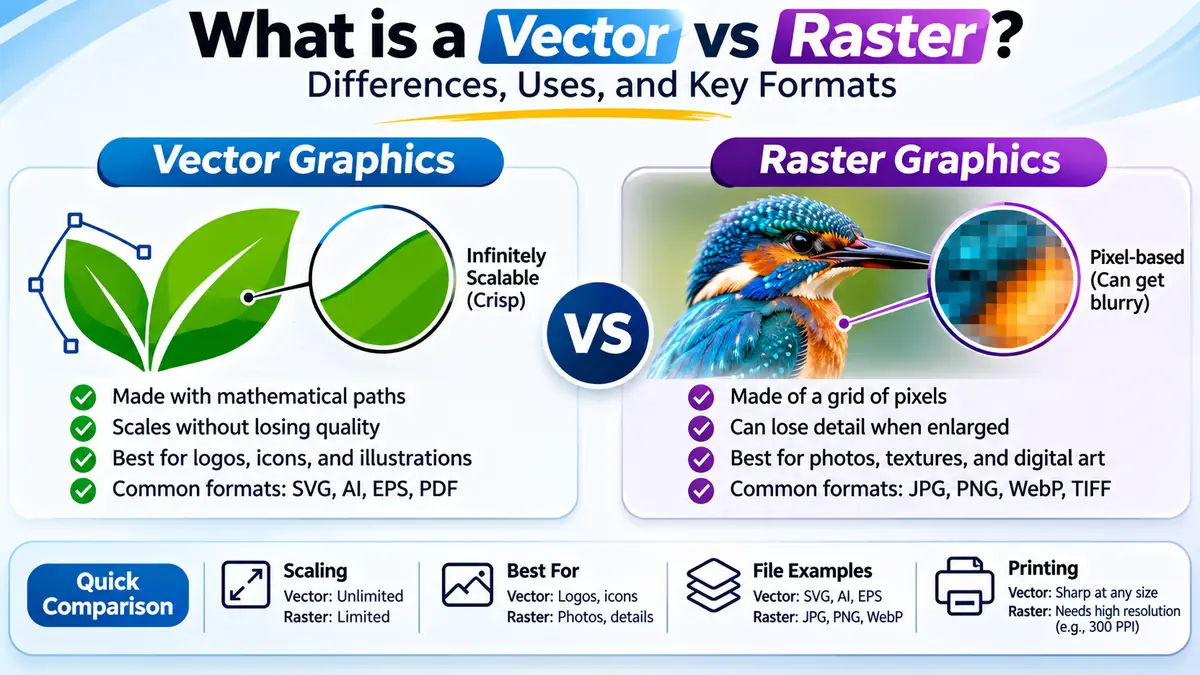
What is a vector vs raster? Vector graphics use mathematical paths, points, and curves to create images that can scale without losing sharpness. Raster graphics use grids of pixels to represent visual detail. Vectors are ideal for logos, icons, and illustrations, while raster images are generally better for photographs, textures, and detailed digital artwork.
Understanding the difference helps designers, photographers, students, marketers, and website owners choose appropriate image formats, preserve visual quality, and avoid common resizing problems.
What Is a Vector vs Raster Image?
Vector and raster are two ways computers represent digital graphics. They may look identical at a particular size, but the underlying image data is fundamentally different.
What Is a Vector Image?
A vector image is built from geometric objects defined by mathematical information. These objects can include points, lines, Bézier curves, polygons, circles, and filled shapes.
Rather than storing the color of every pixel, vector graphics describe how shapes should be drawn.
For example, a vector circle can be defined by its center, radius, fill color, and stroke. A rendering application uses that information to display the circle at the requested size.
This approach provides several advantages:
- Resolution independence: Shapes remain mathematically precise when enlarged or reduced.
- Editability: Individual paths, colors, and objects can often be modified separately.
- Clean edges: Text, icons, and geometric illustrations retain crisp boundaries.
- Potentially small files: Simple designs can require relatively little data.
- Flexible output: The same artwork can be used for small digital icons and large-format printing.
Popular vector editing applications include Adobe Illustrator, CorelDRAW, Affinity Designer, and Inkscape.
Common vector formats include SVG, AI, EPS, and certain PDF files.
However, not every file saved in a vector-capable format contains genuine vector artwork. A PDF or SVG may also contain embedded raster images.
What Is a Raster Image?
A raster image, also called a bitmap image, consists of a rectangular grid of pixels.
Each pixel stores color information. Together, these pixels create the image displayed on a screen or printed on paper.
A photograph measuring 1920 × 1080 pixels contains 2,073,600 pixels. The colors and positions of those pixels determine the visible image.
Raster graphics are particularly effective at representing:
- Photographs and realistic scenes
- Smooth color gradients
- Shadows and lighting
- Complex textures
- Digital paintings
- Detailed image compositions
Adobe Photoshop, GIMP, Krita, and similar programs are commonly used to edit raster images.
Typical raster formats include JPEG, PNG, GIF, WebP, TIFF, and AVIF.
Unlike vector paths, raster images have fixed pixel dimensions. Enlarging them beyond their useful resolution requires interpolation or reconstruction of missing detail.
Vector vs Raster: Key Differences Compared
The most useful way to understand the two formats is to compare their underlying properties.
| Feature | Vector Graphics | Raster Graphics |
|---|---|---|
| Image structure | Mathematical paths and shapes | Grid of pixels |
| Scaling | Maintains geometric sharpness | Can lose detail when enlarged |
| Resolution | Resolution-independent geometry | Fixed pixel dimensions |
| Best applications | Logos, icons, diagrams | Photos, textures, digital paintings |
| Editing | Individual objects and paths | Pixels, layers, selections |
| File size | Often small for simple artwork | Depends on dimensions, detail, compression |
| Common formats | SVG, AI, EPS, PDF | JPG, PNG, WebP, TIFF, AVIF |
| Realistic imagery | Possible but often complex | Naturally suited |
| Animation | Shape and path animation | Frame-based and other animation methods |
| Printing | Excellent for clean shapes and text | Excellent when resolution is sufficient |
Neither format is universally superior. The right choice depends on the content of the image and how it will be used.
Why Vector Images Stay Sharp
Vector artwork does not depend on a fixed grid of source pixels for its geometric shapes.
When you enlarge a vector logo from 100 pixels wide to 2,000 pixels wide, the software recalculates the paths and renders them at the new dimensions.
The edges remain smooth because the geometry is preserved.
This is particularly useful for corporate branding, signage, technical drawings, typography, and interface icons.
Raster images behave differently. Their source detail is limited by the pixels originally captured or created.
Why Raster Images Can Become Pixelated
Suppose you enlarge a 200 × 200-pixel photograph to 2,000 × 2,000 pixels.
The new image has 100 times as many pixel positions, but the original file does not contain 100 times more photographic detail.
Software must estimate the additional pixel values using interpolation, resampling, or AI-assisted upscaling.
Depending on the method, the result may appear soft, blurry, artificially sharpened, or visibly pixelated.
Higher-quality resampling can improve appearance, but ordinary enlargement cannot recover all missing original detail.
How Resolution and Scaling Work
Resolution is one of the most misunderstood aspects of the vector versus raster discussion.
Raster Resolution: Pixels, PPI, and DPI
Raster image resolution is commonly described through pixel dimensions, pixels per inch (PPI), and dots per inch (DPI).
These measurements serve different purposes.
Pixel dimensions describe the actual number of pixels in an image, such as 1200 × 675 or 3000 × 2000.
PPI describes the relationship between image pixels and physical display or print dimensions.
DPI technically describes the density of physical dots produced by an output device, particularly a printer.
People frequently use PPI and DPI interchangeably, but they are not identical.
For example, a 3000-pixel-wide image printed at 300 PPI has a physical width of:
3000 ÷ 300 = 10 inches.
At 150 PPI, the same image can be printed 20 inches wide, although its apparent sharpness at close viewing distances may be lower.
Changing a resolution metadata value without resampling does not add new pixels.
Does Vector Artwork Have Resolution?
The geometry of vector artwork is resolution-independent, but the final display or printed result is not completely separate from resolution.
A vector illustration must eventually be rendered into pixels on a screen or output marks on a printer.
Its mathematical paths remain scalable, while the output device determines the final visible detail.
This distinction explains why vector artwork can be exported at many different raster dimensions without needing to redraw the original shapes.
What Happens When You Zoom In?
Zooming into a vector image generally causes the application to render its paths at the new viewing scale.
Zooming into a raster image eventually exposes the individual pixels or the smoothing used to display them.
One important exception is a vector document containing an embedded photograph. The vector shapes may remain crisp while the embedded photograph becomes blurry.
Vector vs Raster File Formats Explained
Choosing the correct file format is as important as choosing the correct graphic type.
Common Vector File Formats
SVG (Scalable Vector Graphics)
SVG is an XML-based graphics format standardized through the World Wide Web Consortium (W3C).
It is widely used for website icons, logos, diagrams, and illustrations.
SVG supports paths, shapes, text, gradients, and other graphical features. It can also support animation and scripting in appropriate environments.
Because SVG files can contain active content, websites should sanitize untrusted SVG uploads and apply appropriate security controls.
AI (Adobe Illustrator Artwork)
AI is the native document format associated with Adobe Illustrator.
It is commonly used for editable design projects involving paths, typography, layers, and complex illustrations.
AI files may contain embedded raster content alongside vector objects.
EPS (Encapsulated PostScript)
EPS is a long-established format used in certain illustration, publishing, and printing workflows.
It remains relevant for compatibility with older equipment and production systems, although modern workflows often favor PDF or other supported formats.
PDF (Portable Document Format)
PDF can preserve vector graphics, text, and raster images within the same document.
A PDF containing vector artwork is not necessarily an entirely vector file.
For instance, exporting a photograph into PDF does not transform its pixels into mathematical paths.
Common Raster File Formats
JPEG or JPG
JPEG is widely used for photographs and other continuous-tone imagery.
Traditional JPEG compression is lossy, meaning some image information is discarded to reduce file size.
It generally does not support transparency.
PNG
PNG supports lossless image compression and alpha transparency.
It is useful for screenshots, interface graphics, diagrams, and images requiring transparent backgrounds.
However, complex photographs may produce larger PNG files than comparable lossy formats.
WebP
WebP supports lossy and lossless compression, transparency, and animation.
It is frequently used on websites because it can provide a useful balance between image quality and file size.
AVIF
AVIF is a modern image format based on AV1 image coding.
It supports advanced compression capabilities, transparency, and high-dynamic-range image workflows.
Its efficiency depends on the image content, encoder settings, and compatibility requirements.
GIF
GIF is an older indexed-color raster format supporting simple animation.
Its limited color palette makes it less suitable for detailed photographic imagery than modern alternatives.
TIFF
TIFF is a flexible raster container used in photography, scanning, publishing, and archival workflows.
It can store high-quality image data and various forms of metadata, with multiple compression options.
Can a File Contain Both Vector and Raster Graphics?
Yes. Many professional design files combine both.
A magazine layout might contain vector typography, vector decorative elements, and high-resolution raster photographs.
A PDF can preserve these different elements in one document.
Similarly, a vector illustration may use embedded raster textures to create realistic effects.
This is why checking a file extension alone is not enough to determine whether every element is scalable.
When Should You Use Vector Graphics?
Vector graphics are particularly valuable when a design must appear at multiple sizes or requires precise shape editing.
Logos and Brand Identity
A logo might appear on a website favicon, product label, business card, storefront sign, and vehicle wrap.
Maintaining separate raster originals for every possible size creates unnecessary work.
A vector master file allows designers to generate appropriate versions for different applications.
For a logo consisting of typography, symbols, and simple shapes, vector artwork is usually the preferred source format.
Icons and User Interface Elements
Interface icons frequently need to appear at different sizes and pixel densities.
SVG is useful for many web icons because it allows consistent scaling and can support styling through CSS.
For extremely small icons, designers may still adjust geometry or spacing to improve optical clarity.
Illustrations, Diagrams, and Infographics
Flowcharts, maps, scientific diagrams, and instructional illustrations benefit from precise lines and editable labels.
Vector software allows individual elements to be repositioned without repainting the entire image.
This makes updates easier when information changes.
Typography and Print Graphics
Text and line art benefit from sharp geometric outlines.
Professional printing workflows frequently preserve vector shapes for logos, lettering, packaging designs, and other clean-edged artwork.
Vector files are also useful in certain vinyl cutting, laser cutting, and engraving processes, where paths may guide physical equipment.
However, the paths must meet the requirements of the particular machine or production software.
When Should You Use Raster Graphics?
Raster images are the natural choice when the content contains complex visual detail that is difficult to describe efficiently with geometric shapes.
Photography
Digital cameras capture photographs as pixel-based image data.
A landscape, portrait, or wildlife photograph contains variations in lighting, color, texture, and fine detail.
Raster formats are designed to preserve and display these variations.
Converting a photograph into vector paths usually changes its visual character or creates extremely complicated artwork.
Digital Painting and Photo Editing
Raster editors allow artists to work directly with brushes, textures, blending, masks, and pixel-based effects.
They are particularly useful for realistic painting, photo retouching, and detailed compositing.
Applications such as Photoshop and Krita provide tools tailored to these workflows.
Website Photographs and Featured Images
Blog featured images, product photography, and editorial photographs are generally best delivered as optimized raster images.
For example, a 1200 × 675-pixel featured image has a 16:9 aspect ratio and is suitable for many article layouts.
WebP, JPEG, and AVIF are common delivery choices depending on browser support, visual quality, and file-size requirements.
The most effective format is the one that meets the site’s image-quality and performance needs, rather than simply the newest available extension.
Screenshots
Screenshots are captured from a pixel-based display and are therefore raster images.
PNG is often useful for screenshots containing text or sharp interface edges because its lossless compression avoids typical JPEG artifacts.
WebP lossless can also be appropriate.
What Is a Vector vs Raster for Printing?
Printing introduces additional considerations, including physical dimensions, image resolution, color management, and production equipment.
Vector Graphics for Print
Vector graphics are particularly suitable for:
- Logos on packaging
- Business cards and stationery
- Large banners and signs
- Text-based artwork
- Line drawings and technical diagrams
Because vector geometry can be rendered at the output device’s resolution, the artwork does not require a separate high-resolution pixel version for every print size.
However, fonts, strokes, transparency, and color settings still need to be handled correctly.
Raster Graphics for Print
Raster images are widely used in high-quality printing, especially for photographs and detailed artwork.
A properly prepared raster photograph can produce excellent results.
For many close-viewed print projects, 300 PPI at the intended physical size is a common guideline.
It is not a universal requirement. Large-format signage viewed from a distance can often use a lower effective PPI.
For instance, a photograph printed 8 inches wide at 300 PPI needs approximately 2400 pixels of width.
The correct resolution should be confirmed against the printer’s specifications and the intended viewing distance.
RGB vs CMYK: Is This the Same as Vector vs Raster?
No. These are separate concepts.
RGB and CMYK describe color models, while vector and raster describe image representation.
RGB uses red, green, and blue components and is common in digital displays.
CMYK uses cyan, magenta, yellow, and black components and is associated with many printing workflows.
Both vector and raster graphics can use color information appropriate to their file format and production workflow.
Converting from RGB to CMYK does not turn a raster image into a vector image.
How to Convert Raster to Vector and Vector to Raster
Conversion is possible in both directions, but the results are not equivalent.
How to Convert Raster to Vector
Converting a raster image into vector artwork is generally called vectorization or image tracing.
A typical workflow involves:
- Open the raster image in a vector editing application.
- Choose a tracing tool, such as Image Trace in Adobe Illustrator or Trace Bitmap in Inkscape.
- Adjust settings for colors, paths, corners, and noise.
- Generate the vector shapes.
- Inspect and simplify unnecessary paths.
- Correct distorted details manually.
- Save the result in an appropriate vector format.
Simple black-and-white logos, silhouettes, and line illustrations are often good candidates.
Detailed photographs are much more difficult to vectorize cleanly.
Automatic tracing can produce thousands of paths, making the resulting file difficult to edit and potentially larger than expected.
Does Saving a JPG as SVG Make It Vector?
No.
Changing a filename from .jpg to .svg does not change the underlying image structure.
Even embedding a JPEG inside an SVG container leaves the photographic content raster-based.
True vectorization requires converting the image’s visual information into geometric objects.
For professional logo reproduction, manually recreating the artwork can sometimes produce cleaner results than automatic tracing.
How to Convert Vector to Raster
Converting vector graphics into pixels is called rasterization.
The process is straightforward:
- Open the vector artwork in a compatible editor.
- Select an export format such as PNG, JPEG, or WebP.
- Set the required pixel dimensions.
- Choose background and transparency settings.
- Select the appropriate color profile when available.
- Export and inspect the final image.
For example, an SVG logo can be exported as a 512 × 512-pixel PNG for an application interface.
The original SVG should be retained because the exported PNG has fixed pixel dimensions.
Can You Convert Raster to Vector Without Losing Quality?
It depends on the source image and what you mean by quality.
A simple geometric icon can often be reconstructed accurately as vector artwork.
A complex photograph cannot usually be converted into a compact, fully editable vector illustration while preserving every subtle photographic detail.
Tracing tools approximate the original image through shapes and paths.
The quality of the result depends on the source, tracing settings, and manual refinement.
Vector vs Raster for Web Design and SEO
Website performance depends on more than the visual appearance of an image.
File dimensions, compression, rendering complexity, responsive delivery, and browser compatibility all influence the experience.
Is SVG Always Smaller Than PNG?
No.
A simple SVG icon may contain only a handful of paths and require fewer bytes than a comparable PNG.
A highly detailed SVG with thousands of shapes, filters, gradients, or embedded images may be significantly larger.
Likewise, a simple PNG can compress very efficiently.
The correct comparison is between actual files at equivalent visual quality and intended display sizes.
Which Format Is Better for Website Speed?
For simple icons and logos, optimized SVG files are often efficient.
For photographs, optimized WebP, AVIF, or JPEG files are generally more practical.
Website owners should also consider:
- Correctly sized responsive images
- Appropriate compression levels
- Image dimensions that prevent layout shifts
- Lazy loading for suitable offscreen images
- Efficient caching and delivery
- Avoiding unnecessary embedded image data
Google’s Core Web Vitals include Largest Contentful Paint (LCP), which can be affected by large or slowly delivered images.
If a featured image is the page’s LCP element, excessive image size or delayed loading may harm the loading experience.
An important hero image should not automatically be lazy-loaded merely because other images use lazy loading.
Does Google Prefer Vector or Raster Images?
Google does not provide a universal ranking advantage simply because an image is vector rather than raster.
Image discoverability and page performance depend on several factors, including accessibility, descriptive context, supported formats, and proper implementation.
For image SEO, use descriptive filenames, meaningful alternative text where appropriate, relevant surrounding content, and suitable image dimensions.
For a photograph, an optimized raster format is generally the natural choice.
For a simple website logo, SVG may be appropriate.
The format should serve the image’s purpose rather than an assumed ranking shortcut.
Common Mistakes When Choosing Vector or Raster
Several mistakes repeatedly cause unnecessary quality loss and production problems.
Enlarging a Small Raster Logo
A logo downloaded from a website may be only a few hundred pixels wide.
Enlarging it for a large sign can reveal blur and compression artifacts.
The better approach is to obtain the original vector artwork or reconstruct the logo accurately.
Assuming Every PDF Is Vector
A PDF may contain scanned pages, photographs, flattened artwork, or vector objects.
Opening a PDF and zooming in can provide clues, but inspecting its objects in a compatible editor is more reliable.
Using JPEG for Graphics Requiring Transparency
Traditional JPEG does not preserve alpha transparency.
For a logo or icon requiring a transparent background, SVG, PNG, or a suitable WebP export is generally more appropriate.
Exporting Vector Artwork Too Early
If a designer rasterizes a logo before finishing the design, later resizing and editing may become more difficult.
Retaining an editable vector master preserves flexibility.
Assuming Vector Files Are Always Small
Complex vector artwork can include thousands of paths and computationally expensive effects.
Simplifying unnecessary geometry can improve file size and rendering performance.
Ignoring the Final Display Size
A 6000-pixel-wide photograph may be unnecessary for a small article thumbnail.
Conversely, a 400-pixel-wide image may not provide enough detail for a large print.
Choose raster dimensions based on the intended output rather than using one size for every purpose.
How to Choose Between Vector and Raster
A practical decision process starts with the content itself.
| Your project | Recommended format | Main reason |
|---|---|---|
| Company logo | SVG or editable vector master | Flexible scaling |
| Website icon | SVG | Clean geometric edges |
| Blog featured photograph | WebP, AVIF, or JPEG | Efficient photographic compression |
| Product photography | High-quality raster | Preserves fine detail |
| Business card artwork | Vector-based PDF or print-ready file | Sharp text and shapes |
| Detailed digital painting | Raster | Natural brush and texture editing |
| Technical diagram | SVG or another vector format | Precise lines and labels |
| Screenshot with text | PNG or lossless WebP | Sharp interface detail |
| Large photographic banner | High-resolution raster | Preserves photographic content |
| Vinyl cutting design | Compatible vector paths | Supports cutting workflows |
If an image consists mainly of clean shapes, lines, symbols, or typography, vector is usually a strong choice.
If it consists mainly of photographic detail, texture, or realistic lighting, raster is usually more suitable.
For designs combining both, use a workflow that preserves vector objects while retaining appropriately sized raster elements.
Final Thoughts: What Is a Vector vs Raster?
The answer to what is a vector vs raster comes down to how an image is constructed.
Vector graphics use mathematical geometry, making them particularly effective for scalable logos, icons, diagrams, and illustrations. Raster graphics use pixels, making them ideal for photographs, detailed textures, and realistic digital artwork.
Both have limitations. Vector artwork can become complex, while raster images require sufficient pixel resolution for their intended size.
The most reliable approach is to preserve editable original files, choose formats based on image content, and export versions suited to the final screen, website, or print application.
