

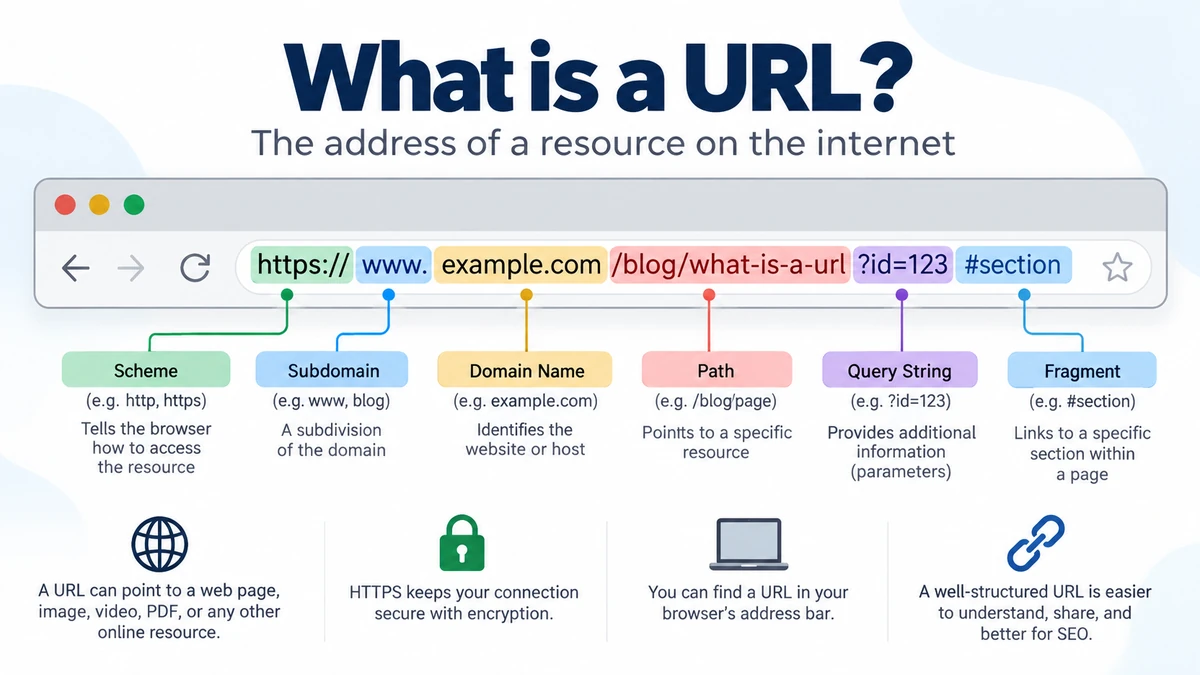
Every time you open a website, click a search result, view an image, or download a file, a URL is working behind the scenes. It tells your browser where the resource is located and, in many cases, how it should be accessed.
A URL (Uniform Resource Locator) is the address of a resource on the internet. It can point to a web page, image, video, PDF, CSS file, API endpoint, or another online resource. A typical URL contains a scheme such as HTTPS, a domain name, and optionally a path, query string, port, and fragment.
For example:
https://www.example.com/blog/what-is-a-url
Here, https tells the browser how to communicate, example.com identifies the host, and /blog/what-is-a-url identifies a particular resource on that website.
What Does URL Stand For?
URL stands for Uniform Resource Locator. It is commonly called a web address, although URLs can identify more than ordinary web pages.
Breaking down the name makes the concept easier to understand:
- Uniform — URLs follow standardized rules so browsers and other software can interpret them.
- Resource — the address can point to a page, image, document, file, service, or other resource.
- Locator — it provides information used to locate that resource.
The URL concept is closely related to the broader term URI, or Uniform Resource Identifier. RFC 3986 defines a URI as a sequence of characters that identifies an abstract or physical resource and describes the generic components as scheme, authority, path, query, and fragment.
A simple URL example
Consider:
https://www.example.com/products/shoes
The browser can interpret it roughly as:
| URL part | Example | Purpose |
|---|---|---|
| Scheme | https | Specifies how the resource is accessed |
| Subdomain | www | Identifies a subdivision of the domain |
| Domain | example.com | Identifies the website/server host |
| Path | /products/shoes | Identifies a particular resource |
Real URLs can be considerably more detailed.
what is a url Made Of?
Understanding the anatomy of a URL is useful even if you never build a website.
A more complete example looks like this:
https://shop.example.com:443/products/shoes?color=black&size=10#reviews
This address contains several components:
https → schemeshop → subdomainexample.com → domain:443 → port/products/shoes → path?color=black&size=10 → query string#reviews → fragment
Not every URL needs all of these components. The exact structure depends on the URL scheme and context.
1. Scheme or protocol
The scheme appears at the beginning of the URL:
https://
It tells software how the resource should be handled. For websites, the schemes people encounter most often are:
http://https://
HTTP stands for Hypertext Transfer Protocol, while HTTPS is its secure form used for encrypted communication between the browser and server.
Other URI schemes exist as well, including file:, ftp:, data:, and mailto:.
For ordinary modern websites, HTTPS is the standard choice.
2. Subdomain
Consider:
https://blog.example.com
Here:
blog is the subdomain.
A subdomain can be used to organize a website into separate areas. You may encounter addresses such as:
blog.example.comsupport.example.comshop.example.com
www is also commonly used as a subdomain, although a website does not have to use it.
3. Domain name
The domain name is the recognizable name associated with the website.
In:
https://www.example.com
the domain is:
example.com
A domain name should not be confused with the complete URL. The domain is only one component of a URL. A URL can include the protocol, domain, path, parameters, and other information.
For example:
Domain: example.com
URL: https://example.com/blog/article
Both contain example.com, but only the second provides the complete address for the particular page.
4. Top-level domain
The final portion of a traditional domain name is the top-level domain, usually abbreviated as TLD.
Examples include:
.com.org.net.edu
Country-code top-level domains also exist, such as .uk, .ca, .au, and .pk.
In:
example.com
example is the second-level domain and .com is the TLD.
5. Port
A URL can specify a network port:
https://example.com:443/page
The 443 is the port number.
For ordinary web browsing, ports are generally invisible because browsers and servers use standard defaults. HTTP commonly uses port 80, while HTTPS commonly uses port 443. If the standard port is being used, it normally does not need to appear explicitly in the URL.
6. Path
The path comes after the authority or domain and identifies a resource within that site.
For example:
https://example.com/blog/url-guide
The path is:
/blog/url-guide
Paths often resemble folders and filenames, but that does not necessarily mean the resource is stored in matching physical folders on the server. Modern web servers and applications can map paths to dynamically generated content.
7. Query string and parameters
You have probably encountered long addresses containing question marks and ampersands.
For example:
https://example.com/search?q=laptop&sort=price
Everything beginning with ? is the query component:
?q=laptop&sort=price
It contains parameters such as:
q=laptop
and:
sort=price
Parameters commonly provide additional information to the server or application. They can be used for searches, filters, sorting, tracking, pagination, and other functions. A query begins after ?, while multiple key/value pairs are commonly separated using &.
8. Fragment or anchor
A URL can point directly to a particular location within a resource.
For example:
https://example.com/guide#security
The fragment is:
#security
This can tell the browser to move directly to a corresponding section of the page.
One important technical distinction is that the fragment is generally processed by the client, such as the browser, and is not sent to the server as part of the resource request.
Quick Takeaway: A web URL commonly follows a structure similar to scheme://domain/path?query#fragment. The scheme and host tell the browser how and where to connect, while the remaining components can identify a particular resource, provide parameters, or target part of a resource.
How Does a URL Work?
A URL looks like a simple line of text, but several processes can occur after you enter one into a browser.
Suppose you enter:
https://example.com/articles/url-basics
At a simplified level:
- The browser parses the URL. It identifies components such as the HTTPS scheme, hostname, and path.
- The hostname must be resolved. The browser ultimately needs the network information required to reach the appropriate server. The Domain Name System, or DNS, plays a central role in mapping domain names to IP addresses.
- A connection is established. For an HTTPS website, this includes establishing secure communication.
- The browser requests the resource. The path and any relevant query information help identify what is being requested.
- The server returns a response. That may contain HTML, an image, JSON, a file, a redirect, or another response.
- The browser processes the result. For an HTML page, it may subsequently request CSS, JavaScript, fonts, images, and other resources referenced by the document.
URLs therefore connect human-friendly navigation with the technical systems used to retrieve resources across the web.
What Is the Difference Between a URL, Domain, URI, and Link?
These terms are frequently used as though they mean the same thing. They are related, but there are useful distinctions.
| Term | Meaning | Example |
|---|---|---|
| URL | Address used to locate/access a resource | https://example.com/blog/post |
| Domain | Human-readable host name | example.com |
| URI | Broader identifier concept | Includes URL-style identifiers |
| Hyperlink | Clickable reference that can point to a URL | “Read this guide” |
| IP address | Numerical network address | 192.0.2.1 |
URL vs. domain
A domain identifies the website or host, while a URL can identify a particular resource within it.
For example:
example.com
is a domain.
But:
https://example.com/images/photo.jpg
is a URL containing that domain.
One domain can therefore be associated with many different URLs.
URL vs. URI
URI means Uniform Resource Identifier.
URL is commonly treated as a type of URI used to locate a resource. RFC 3986 defines the generic URI syntax and components used for identifying resources.
For everyday browsing, you rarely need to worry about the distinction. It becomes more relevant in web development, networking, APIs, and standards documentation.
URL vs. link
A URL is the address itself. A hyperlink is a clickable element that can reference that address.
For example, a webpage might display:
Read our beginner’s guide
while the underlying hyperlink points to:
https://example.com/beginners-guide
The visible words and destination URL do not have to be identical. This distinction also matters for security because a link’s visible text can disguise a different destination.
What Are the Different Types of URLs?
URLs can be classified in several ways, but one of the most useful distinctions is between absolute and relative URLs.
Absolute URL
An absolute URL provides the complete address needed to identify a resource independently of the current page.
Example:
https://example.com/images/logo.png
It includes the scheme and host along with the resource path.
Absolute URLs are particularly useful when linking to resources on another website or when the address needs to work independently of its surrounding document.
Relative URL
A relative URL leaves out information that can be determined from the current page.
For example:
/images/logo.png
If that reference appears on a page at https://example.com, the browser can resolve it against the current page or site to determine the complete destination.
Relative references are commonly used for internal website resources because they can be shorter and easier to maintain.
Dynamic URLs
A dynamic URL commonly contains query parameters generated or interpreted by an application.
Example:
https://example.com/products?category=shoes&sort=price
Ecommerce sites, search systems, filters, dashboards, and web applications frequently use URLs like this.
Static-looking URLs
A cleaner address might look like:
https://example.com/products/running-shoes
The term “static” can be misleading because a clean URL does not prove that the underlying page is a static HTML file. Modern content management systems can generate content dynamically while presenting simple paths to visitors.
What Is a URL Example?
A basic website address might be:
https://example.com
A URL pointing to an article could be:
https://example.com/blog/how-the-web-works
An image might have:
https://example.com/images/header.jpg
A search page might use:
https://example.com/search?q=computer
And a URL targeting a particular section could look like:
https://example.com/guide#installation
URLs are not limited to HTML webpages. Browsers and web technologies use them to reference resources such as images, stylesheets, JavaScript files, video, audio, and embedded documents.
Where Can You Find a URL?
The easiest place to find the URL of the page you are viewing is your browser’s address bar.
Browsers such as Chrome, Firefox, Safari, and Edge display the current page’s address there, although the visual presentation can vary.
To copy a page URL on a desktop browser, you can usually:
- Click the address bar.
- Select or highlight the address.
- Copy it using the browser’s copy function or keyboard shortcut.
- Paste it wherever you need it.
On phones and tablets, browsers generally provide a Share or Copy link option.
Keep in mind that browsers may simplify how an address appears visually. If you need the exact address, copy the URL rather than relying only on what is visibly displayed.
HTTP vs. HTTPS in a URL
One of the first things you may notice in a web address is http or https.
HTTP is the protocol used to exchange web resources. HTTPS adds encryption to protect data while it travels between your browser and the server.
So:
http://example.com
and:
https://example.com
are technically different URLs.
For ordinary websites, HTTPS should be used because it protects data in transit and lets browsers authenticate the server through the TLS certificate system.
However, HTTPS does not automatically mean that the organization behind a website is trustworthy. A malicious website can also use HTTPS. The scheme tells you that the connection is encrypted; you still need to inspect the actual domain and use normal security judgment.
How to Check Whether a URL Is Safe
Understanding URL structure can help you recognize suspicious links.
Before entering a password, payment information, or other sensitive data, inspect the hostname carefully.
Consider this hypothetical URL:
https://accounts.example.com.login-security.test
A quick glance might make accounts.example.com look like the destination. But the hostname must be interpreted correctly rather than simply trusting the first recognizable words.
Useful habits include:
- Check the actual domain carefully.
- Watch for misspellings and lookalike characters.
- Be cautious with unexpected shortened links.
- Do not assume HTTPS alone makes a site legitimate.
- Treat unexpected login or payment links with extra care.
- Avoid entering credentials after following suspicious messages.
- Preview a link’s destination when your browser or device allows it.
Also pay attention to the @ character in unusual URLs. URI authority syntax can contain user information before the host, so text appearing before @ should not automatically be interpreted as the destination domain.
Quick Takeaway: When checking a suspicious URL, focus on the actual hostname rather than recognizable brand words placed elsewhere in the address.
What Makes a Good Website URL?
A URL only needs to be valid and correctly routed to work, but website owners can make addresses much easier for humans to understand.
Compare:
https://example.com/p?id=78429&cat=12
with:
https://example.com/guides/url-structure
Both could work perfectly. The second, however, communicates its likely subject before the visitor opens it.
For public webpages, useful practices generally include:
- Keep paths readable and descriptive.
- Use words that reflect the page content.
- Avoid unnecessary parameters when a simpler structure is possible.
- Keep capitalization conventions consistent.
- Avoid unnecessarily deep folder structures.
- Use HTTPS.
- Avoid frequently changing established URLs without redirects.
- Keep the same content from being unnecessarily accessible through many different URL variants.
Google’s current Search documentation recommends simple, descriptive URL structures and advises using readable words rather than long, unintelligible identifiers where practical. Google Search documentation on URL structure
Readable URLs are primarily good for users and site organization. They can also help search engines understand site structure, but rewriting a URL alone does not make weak content rank well.
Why URLs Matter for SEO and Website Structure
Search engines discover and crawl webpages through URLs, so URL management is an important part of technical SEO.
A descriptive path such as:
https://example.com/guides/email-security
provides more context than:
https://example.com/page?id=93872
Still, URL wording is only one small part of search optimization. Helpful content, crawlability, internal linking, page quality, canonicalization, performance, and many other factors matter.
Website owners should pay particular attention to duplicate URL variants.
For example, tracking parameters might create addresses such as:
https://example.com/guide?utm_source=email
while the main page is:
https://example.com/guide
Depending on how the website is configured, multiple URLs can expose the same or substantially similar content. Canonical URLs, redirects, and consistent internal linking can help search engines understand which version should be treated as primary.
Changing an existing URL requires care
Changing:
/old-guide
to:
/new-guide
without properly handling the old address can break bookmarks, external links, internal links, and search-engine references.
When a permanent page URL changes, website owners commonly use an appropriate permanent redirect from the old location to the new one and update internal links.
A well-planned URL structure is therefore not just cosmetic. It contributes to maintainability, navigation, crawling, and long-term website organization.
What Is URL Encoding?
URLs sometimes contain unusual combinations such as:
%20
This is related to percent-encoding.
URI syntax reserves certain characters for structural purposes. When data contains characters that cannot safely appear directly in a particular component, those characters may be represented using a percent sign followed by hexadecimal digits.
For example, a space may appear as:
%20
RFC 3986 defines percent-encoding as part of generic URI syntax and discusses UTF-8 encoding for characters outside the basic unreserved set in relevant contexts.
You usually do not need to manually encode URLs during normal browsing. Browsers, programming languages, and web applications generally handle the required conversion.
Can Two URLs Show the Same Page?
Yes.
Although URLs are used to identify resources, different URLs can sometimes return the same or substantially similar content.
For example, a site could potentially serve the same page through:
https://example.com/product
and:
https://example.com/product?source=homepage
The query parameter may be used for tracking while the visible content remains unchanged.
Redirects create another common situation. An old URL may send the browser to a newer address after a page has moved.
This is why saying that every URL always equals one permanently unique page is an oversimplification. MDN notes that, although valid URLs theoretically point to unique resources, resources can move or cease to exist and URL handling ultimately depends on the web server.
Can a URL Point to Something Other Than a Webpage?
Yes. This is one of the most commonly overlooked parts of what is a url.
A URL can identify many kinds of resources, including:
- HTML pages
- Images
- PDF documents
- CSS stylesheets
- JavaScript files
- Audio and video
- Downloadable files
- API endpoints
URLs are deeply integrated into HTML, CSS, JavaScript, browsers, servers, and other technologies that make the web function.
A page you see in a browser may itself trigger requests to dozens or hundreds of additional URLs to load its images, fonts, scripts, styles, analytics resources, and other components.
Why Are Some URLs So Long?
Long URLs usually contain additional paths, query parameters, identifiers, tracking information, or application state.
For example:
https://example.com/search?category=laptops&brand=example&sort=price&page=2
This URL communicates several pieces of information to the application.
Long URLs are not automatically bad. Ecommerce filters, search tools, analytics systems, and web applications often legitimately need parameters.
The practical issue is unnecessary complexity. If multiple parameters do nothing useful, create duplicate versions of pages, or make addresses difficult to manage, the URL architecture may need improvement.
Final Thoughts on what is a url
So, what is a url? A URL, or Uniform Resource Locator, is a structured address used to locate a resource on the internet. It tells a browser where a resource is and can also provide information about how it should be accessed.
The most familiar URLs combine a scheme such as HTTPS with a domain and path, while more complex addresses can include a subdomain, port, query parameters, and fragment.
Once you understand those pieces, a long web address stops looking like a random string. You can tell which website it belongs to, what resource it targets, what extra instructions it carries, and where to look when checking whether a link is trustworthy.
